Is there a Windows File Explorer for Mac?
Short answer: no. Microsoft does not make File Explorer for the Mac, and the Mac's own file manager is Finder. Finder can do most of the same jobs, but it lays them out differently and leaves out a few things Windows users reach for every day. Here is what changes, how to get closest in Finder, and an app that brings the File Explorer layout to your Mac.
Finder is the Mac's File Explorer, with a different layout
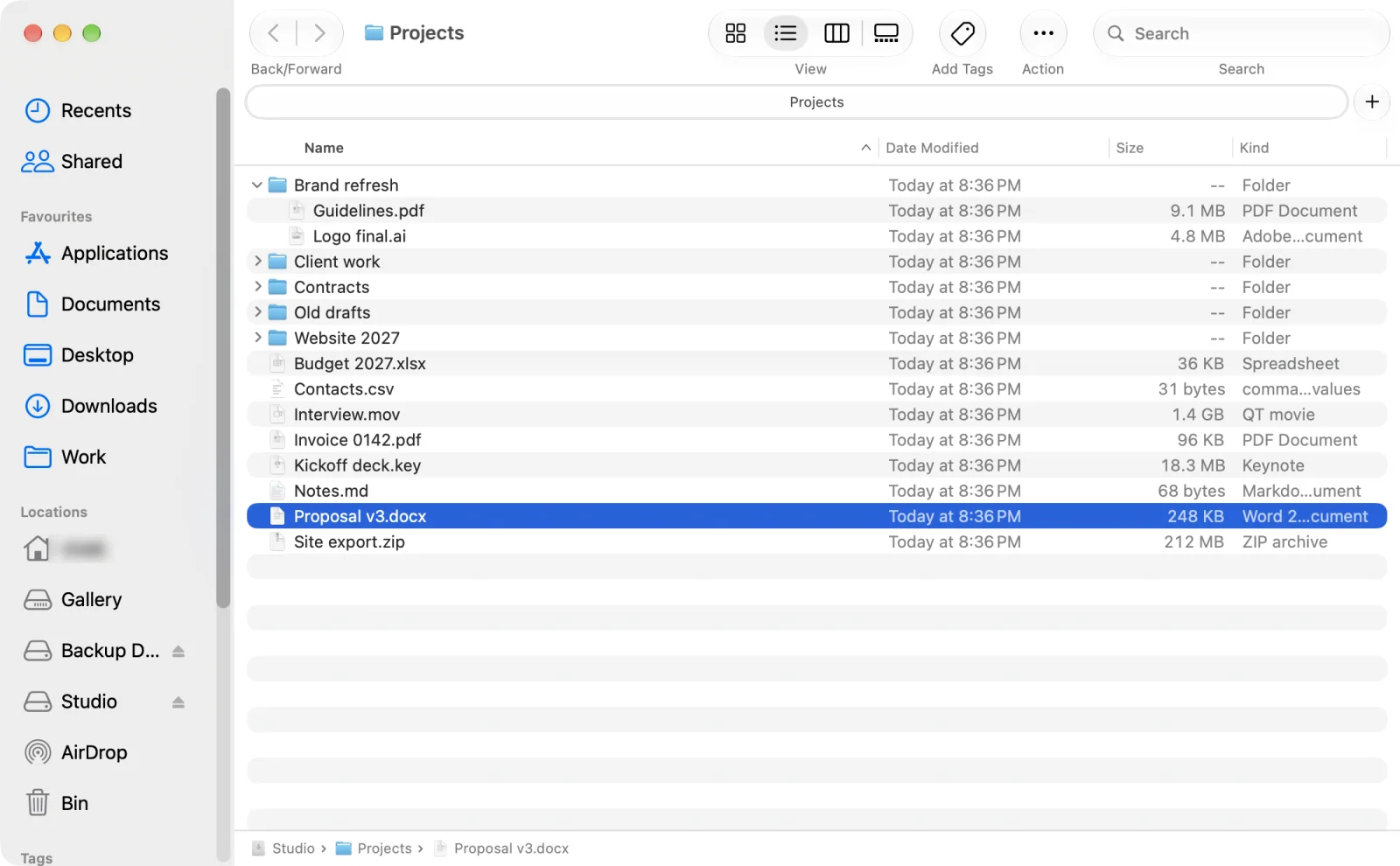
Open Finder next to File Explorer and the parts are there, just not where your eyes go looking. The sidebar holds favourites and drives instead of a folder tree. The path sits in a bar at the bottom of the window, if you switch it on, instead of an address bar at the top. And the Edit menu has a Cut command that stays greyed out for files.
The four things switchers miss most
- Cut and paste. Finder has no Cut for files; you copy, then move with ⌥⌘V. How to cut and paste files on a Mac.
- A folder tree. Finder's sidebar is a list of places, not a tree. How to get a folder tree view on Mac.
- An address bar. Finder shows the path at the bottom and types paths in a separate box. How to show and type the full path.
- Views that stay put. Icon sizes and view settings live per folder, and "Use as Defaults" is one of the most searched Finder complaints. How to set one view for all folders.
Your File Explorer keys, on a Mac
On a Mac, ⌘ takes the place of Ctrl and ⌥ the place of Alt. Here is how the everyday File Explorer shortcuts map to Finder, and to Origin with its Windows key set.
| What you want to do | Windows File Explorer | Finder | Origin (Windows keys) |
|---|---|---|---|
| Cut a file | Ctrl+X | No Cut: ⌘C, then ⌥⌘V | ⌘X |
| Paste | Ctrl+V | ⌘V | ⌘V |
| Rename | F2 | Return | F2 |
| Open the selected item | Enter | ⌘↓ | Return |
| Back to the previous folder | Backspace or Alt+← | ⌘[ | ⌫ |
| Up one level | Alt+↑ | ⌘↑ | ⌥↑ |
| Type a path | Alt+D (address bar) | ⇧⌘G (Go to Folder box) | ⌥D (address bar) |
| Refresh | F5 | Not listed | F5 |
| New folder | Ctrl+Shift+N | ⇧⌘N | ⇧⌘N |
| Open the file manager from any app | Win+E | Not listed | ⌃⌥⌘E, or your own |
The Finder keys come from Apple's Mac keyboard shortcuts and Apple's guide to renaming; the File Explorer keys from Microsoft's Windows keyboard shortcuts.
Your options
1. Tune Finder
Turn on the path bar (View > Show Path Bar), use list view with its disclosure triangles as a stand-in for a tree, learn ⌥⌘V to move files, and keep folders on top in Finder Settings > Advanced. It costs nothing, and it gets you part of the way.
2. A two-pane file manager
Apps like ForkLift and Commander One are built around two panes side by side, in the tradition of Total Commander. They are powerful, and great if you think in two panes. They do not try to look like File Explorer.
3. Origin: File Explorer's layout, on your Mac
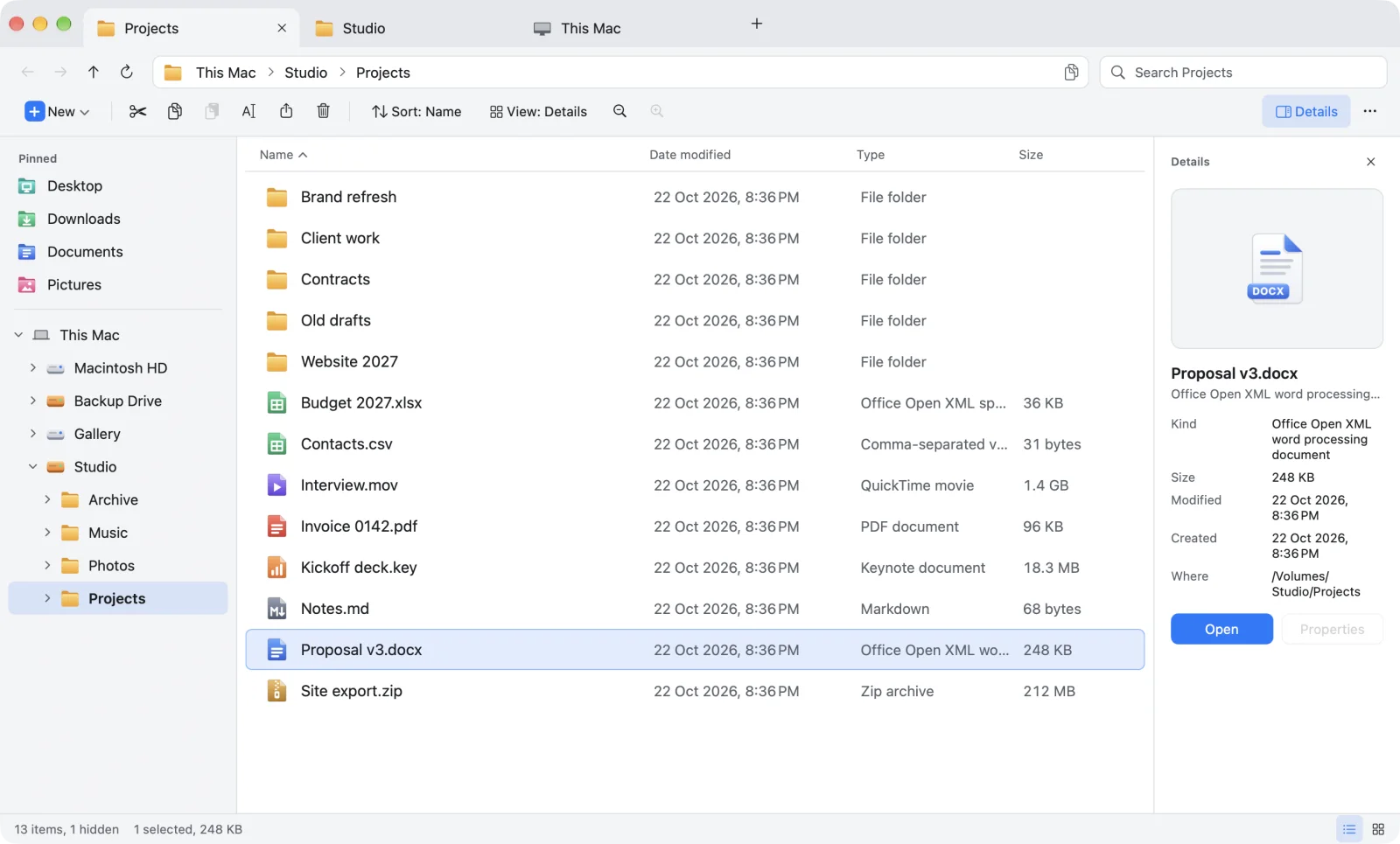
Origin brings the whole File Explorer layout to the Mac: tabs in the title bar, an address bar you can type into, a command bar with Cut, Copy, Paste and Rename, a navigation pane with a real folder tree, a details pane on the right and a status bar. Pick Windows keys or Mac keys and change any shortcut. Underneath, it is built never to lose a file: your original stays put until its copy is checked on disk.
Questions
Is there a Windows File Explorer for Mac?
Microsoft does not make File Explorer for macOS. The Mac's built-in file manager is Finder. Apps such as Origin bring the File Explorer layout to the Mac: a folder tree, an address bar, a command bar, tabs and real cut and paste.
What is the Mac equivalent of File Explorer?
Finder. It opens from the Dock and handles browsing, copying, moving and deleting files, but with a different layout: a sidebar of favourites instead of a folder tree, a path bar at the bottom instead of an address bar, and no Cut for files.
Can I use Windows shortcuts in Finder?
Only partly. Command takes the place of Ctrl for copy and paste, but Finder renames with Return, opens with Command-Down Arrow and goes back with Command-[. Origin offers a Windows key set where F2 renames, Return opens and Backspace (the Mac's delete key) goes back.
Does Origin replace Finder?
It works alongside Finder. Use Origin for your everyday file work; Finder stays exactly as it is, and you can drag files between the two.
Sources: Apple: Mac keyboard shortcuts · Apple: Rename files, folders and disks · Microsoft: Keyboard shortcuts in Windows
File Explorer, reborn for Mac
Origin looks and works like Windows File Explorer, made properly for the Mac: a folder tree, an address bar, a command bar, tabs and real cut and paste. The beta is open now on TestFlight, and Origin is coming soon to the Mac App Store for macOS 14 or later. Join the beta and try it first.
Join the beta See the Origin file explorer for Mac